
- よく見られているキーワード
-
- 関連するキーワードで絞り込む
-
reissue a receipt
Please the reissue yourself from the "Issue of Receipt" menu.
click the button to "reissue".
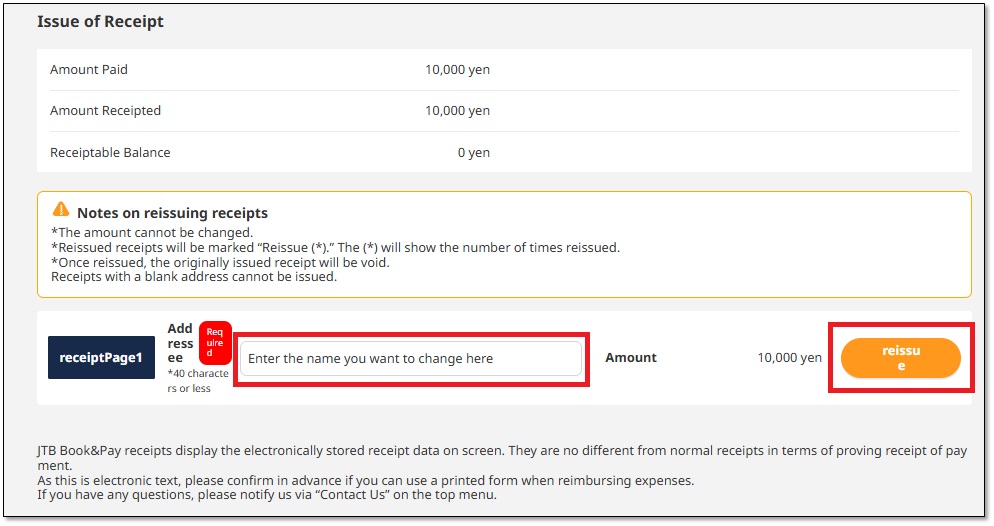
Reissue of Receipts
An electronic receipt will be issued as a PDF file.
Reissued receipts will have the number of times they have been issued displayed below the issue date, such as "Reissue (1)."
The previously issued receipt will be invalid, so please discard it yourself.
(Click here for a sample receipt.)
The following details cannot be changed when reissure.
① Issued Amount
The amount cannot be changed when reissure.
If you would like to change the amount, select "About Reseceipts" from the "Inquiry" menu,
specify the "Receipt name" and "Amount," and contact us.
A receipt (PDF) issued by our Support Center will be sent to you by email.
② Notes
The notes cannot be changed. They will state "As part of the travel fee."
③ Payment Method
The ‘Payment Method‘ information cannot be changed.
You can download the receipt in PDF format.
Was this helpful?
please let us know your thoughts.