
- よく見られているキーワード
-
- 関連するキーワードで絞り込む
-
don't know my phone number
Please enter the phone number registered on the reservation screen.
- The phone number entered on the payment screen has been entered (Please enter the phone number registered on the reservation screen).
- Hyphens have been entered.
- Incorrectly entering your mobile phone number, work mobile phone number, or home landline number.
- Missing or overflowing digits.
- Insufficient country code. *International users may need to enter "+country code" at the beginning.
If you have included the "+" symbol before your phone number when making your reservation, please enter the phone number, including the "+" symbol, in the phone number field.
If you are locked out, please wait 5 to 10 minutes and try again.
If you are unable to log in using the above method, please contact the accommodation you booked with and confirm your registered phone number.
(When contacting us, please provide the following information):
- The reservation was made through JTB Book&Pay.
- The 10-digit transaction number.※ *This is included in the reservation completion notification email.
- Your name, reservation dates, etc.
transaction number.※
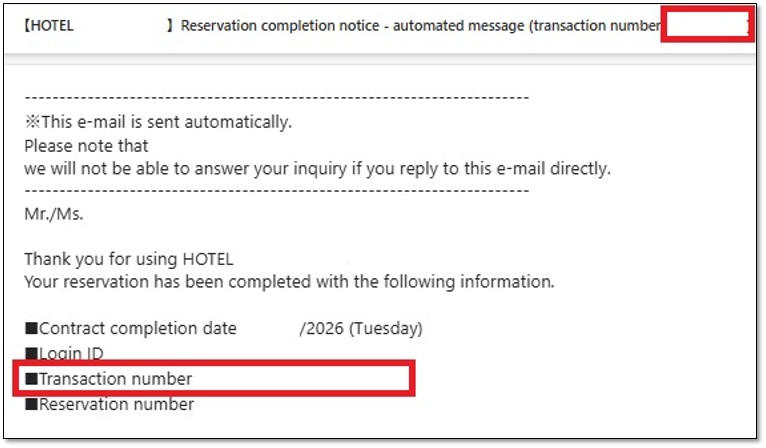
If you need to cancel your reservation or have other urgent needs, please contact the accommodation directly.
Was this helpful?
please let us know your thoughts.